AI that won’t embarrass you.
A rule check, the guard’s assessment and human approval. Any change to the content after approval goes back for a decision, and a copy of every published post goes to the archive.
AI speeds up writing, but you’re the one responsible for what goes out under your company’s name. That’s why every post in the centre follows the same path: rule check → the guard’s assessment → human approval → publishing → archive. No step can be skipped.
Brand rule check — every time you save
When you save a post’s text, the check immediately reviews it against your brand and industry rules and tells you in plain words what to fix. There are three kinds of remarks:
- block — the post won’t go for approval until you fix it (the reason is shown next to the button),
- to confirm — the approver ticks each box separately, only if it’s true,
- note — information that doesn’t hold anything up.
The rules depend on the industry chosen when the brand was set up. For medical devices they are stricter — exactly as the law on advertising these devices requires.
The guard — a second model, before you read the post
A brand with the AI assistant also gets the guard: a second, more powerful AI model reads every post waiting for approval alongside the brand notes and advertising law. It leaves an assessment and specific passages to improve. The guard advises; it doesn’t block — the decision stays with a person.
Approval in one click
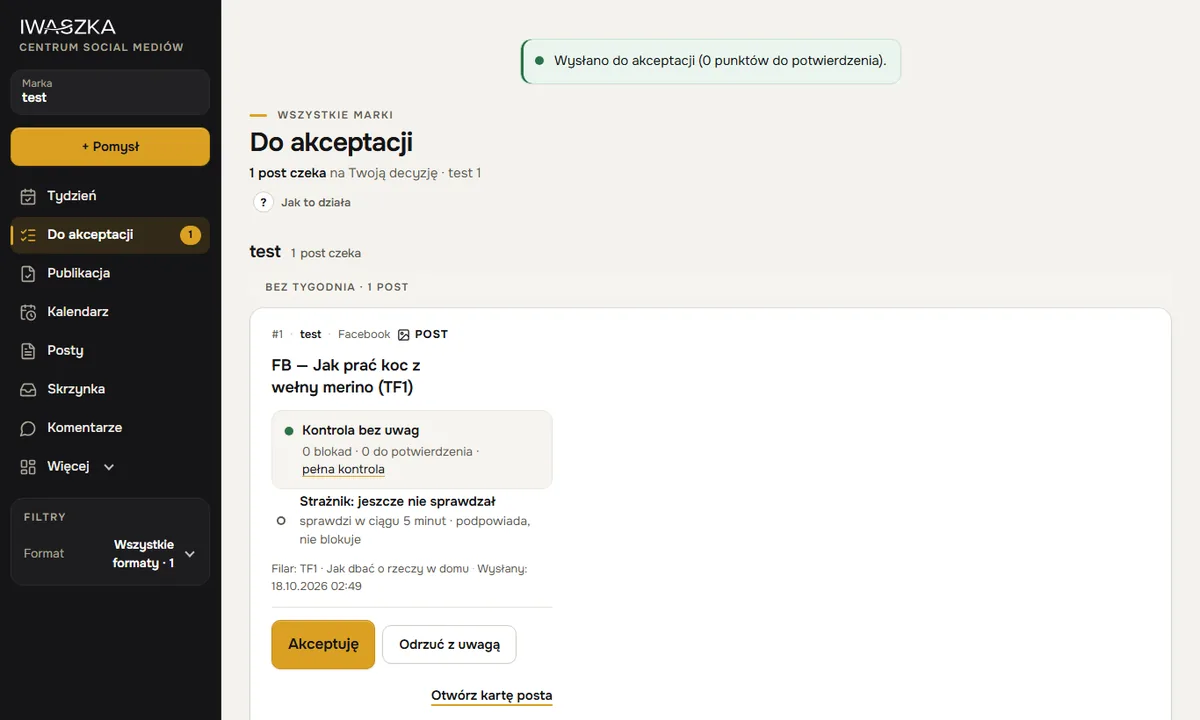 example
On the To approve screen each post sits on a single card: a preview as your audience will see it, the results of the check and the guard, and the decision. Click “Approve” — the post goes out at the scheduled time. Or “Reject with a note” — write what to change, and the note goes to the person who prepared the post. In “Week” you can approve several posts at once.
- Approval is given by the person named for the brand — you, a partner, an agency’s client. Others can see the post, but don’t get the button.
- Approval covers exactly this content. Changing the text, image or channels after approval sends the post back for a fresh decision.
- You can only approve when signed in with your password and a code from your authenticator app.
Edits we learn from
The centre records what was changed before approval and why — the “Edits” screen shows it in numbers. Based on that, you add rules to the brand notes — and the assistant, which writes from those notes, stops repeating the same mistakes.
Publishing and the archive
Once approved, a post for Facebook, Instagram or X is published by the centre automatically, at the scheduled time. For LinkedIn it prepares a ready-to-paste package (text and image) that you paste in, then save the link to the post. A copy of every published post stays in the brand’s archive — with the date, channel and address.
Who it matters most for
Clinics, salons and shops selling health products, where one careless phrase (“cures”, “100% effective”) can cause trouble. Agencies, where one person writes the post and the client approves it. And any business that wants AI to help — not to speak on its behalf unchecked.
Questions
Can an agency’s client approve posts for their own brand?
Yes. For each brand you name the approver — it can be a client with their own account in the centre. They only see their own brands.
Can the guard stop a post?
The guard advises — it leaves an assessment and passages to improve, but it doesn’t block. A post can be stopped by the rule check (a block) or by the approver.
What if I change a post after approval?
The post goes back for approval. Approval always covers exactly the content that will go out.
Who is responsible for published content?
The person who approved it, on behalf of their company. The check and the guard help catch risky phrases, but a person makes the decision.
Are copies of published posts kept?
Yes. A copy of every published post stays in the brand’s archive — with the date, channel and address. For medical devices this is a legal requirement (2 years).
See also
Security
Password plus app code, lock-out after failed attempts, change history, a publishing archive and hidden health data. Your data stays in the European Union.
AI assistant
The AI assistant writes posts from your note, following your brand strategy and brand notes. It asks instead of inventing and learns from your edits. You approve.
Your first week of posts — today.
Account about 5 minutes, brand about 20–25 minutes, then about 15 minutes a week. No payment card. Sign-up is open to companies registered in Poland; the sign-up form and the app are in Polish for now. Elsewhere? Write to kontakt@iwaszka.pl.
Create account