A weekly plan that falls into place.
One screen, once a week: decisions, the plan, empty days and results. The assistant suggests topics; you provide the facts and approve.
Most businesses aren’t short of ideas — the hard part is sitting down every week, turning them into a plan and not missing a single day. The Week screen in the centre is built around one question: what do I need to do this week so that my brand posts regularly? The answer usually takes about a quarter of an hour.
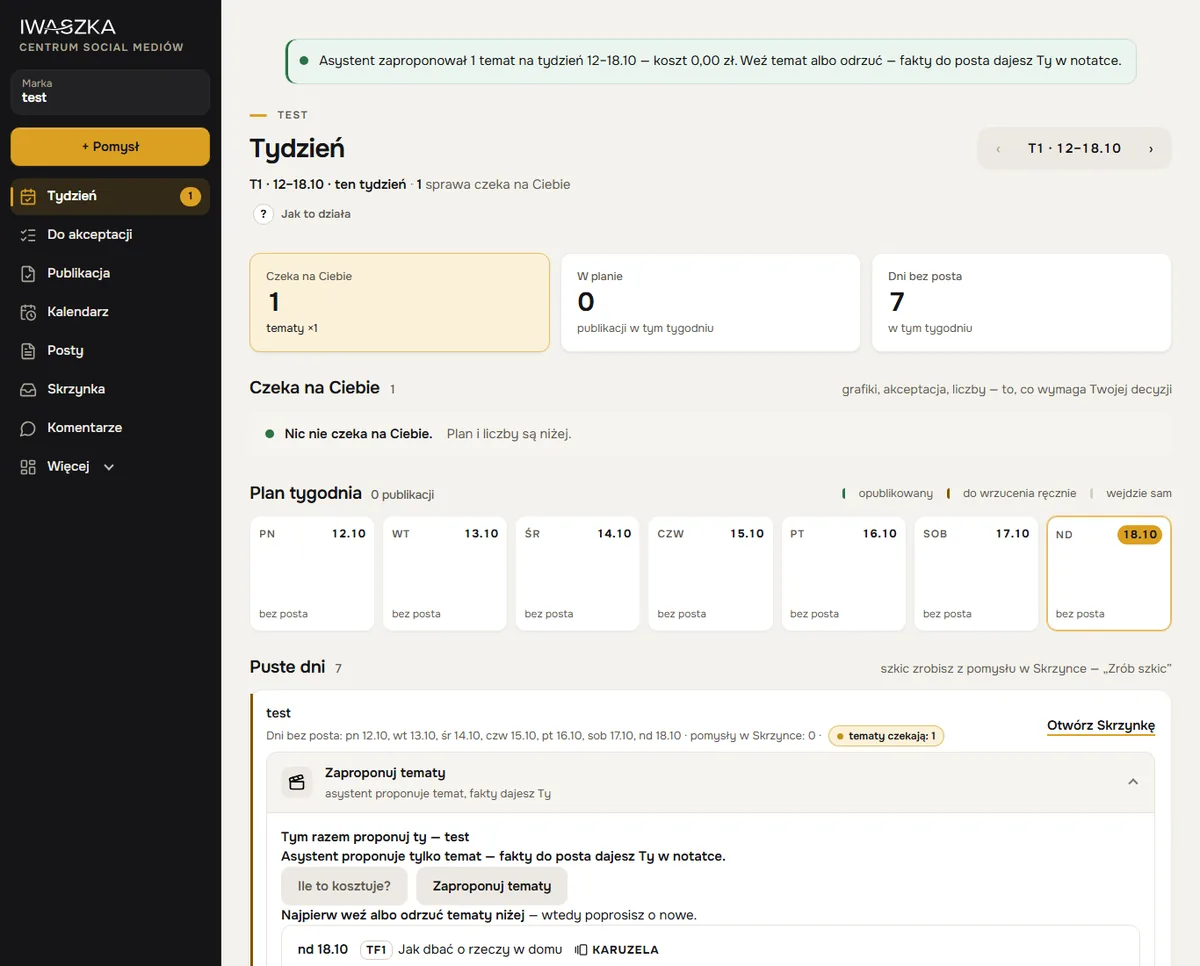 example
Three tiles instead of ten lists
At the top there are three numbers: Waiting for you, Planned and Days without a post. Each tile takes you to its part of the screen. Things are arranged by task, not by brand — first whatever needs your decision, then the plan and the empty days. Everything else is collapsed so it doesn’t distract you.
Waiting for you
This is where everything the week can’t start without ends up:
- The graphics question — “are you doing them yourself, or shall I give you options to choose from?”. One click per week; you can change your mind until Sunday.
- Posts to approve — tick several and approve them with a single button. A post that needs a closer look (for example, when a check asks for confirmation) shows the reason alongside, and you open it on its own card.
- Numbers to fill in — when you publish manually on LinkedIn or Threads, the centre reminds you to enter the results.
The plan, day by day
The “Weekly plan” covers seven days from Monday — a grid on a computer, a list on a phone. Each entry shows the time, channel, title, brand and its status in plain words: “scheduled — will go out automatically”, “to post manually”, “to approve”, “draft” or “published”. Today is highlighted. Switch weeks with the arrows — the plan reaches up to a month ahead.
Running several brands? See them all in one plan, or pick one with the switch at the top of the screen.
Empty days: topics from the assistant
Below the plan there’s a row with the days without a post and the number of ideas in your Inbox. Got an idea? Turn it into a draft. Haven’t? Click “Suggest topics” and the assistant proposes between 2 and 5 topics for the free days, drawn only from your brand’s strategy pillars. Before the AI model is asked anything, the “How much will this cost?” button shows the cost — without running it.
The assistant suggests the topic; you provide the facts. For each topic you jot down a few words: what, who, when, where. That note is what the post draft is later written from. So your posts never contain made-up prices, dates or promises.
The rhythm of the week
The centre prepares the weekly package on Sunday from 18:00 — for the week starting on Monday. On Sunday evening you can open it with the arrow, and from 00:00 on Monday the screen shows the new week by itself. You can plan up to a month ahead, and a single daily notification on your phone reminds you what’s waiting.
What worked last week
Once results come in, a What worked section appears above the plan: the brand’s best posts, averages by format and comments by type. The conclusions feed into the next suggestions — the assistant may, for instance, suggest returning to a topic that did well a few weeks ago.
Questions
Do I have to plan every week?
You don’t have to, but it’s the simplest rhythm: on Sunday evening or Monday morning you open “Week” and deal with everything there. The plan reaches up to a month ahead.
Where does the assistant get its topics from?
From the pillars of your brand’s strategy, which you approve when you set up the brand. It suggests a topic — it never makes up the facts for the post.
Can I see all my brands at once?
Yes, the plan shows every brand you have access to. You pick a single one with the switch at the top of the screen.
How long does it take each week?
Usually about 15 minutes: choosing topics for the empty days, writing short notes, reviewing drafts and approving several posts at once.
Which day does the week start on?
Monday. On Sunday evening “Week” already shows the following week, so you can plan it in advance.
See also
AI assistant
The AI assistant writes posts from your note, following your brand strategy and brand notes. It asks instead of inventing and learns from your edits. You approve.
Approval and checks
A brand rule check every time you save, an AI guard before approval, one-click approval by the named person and an archive of every published post.
Your first week of posts — today.
Account about 5 minutes, brand about 20–25 minutes, then about 15 minutes a week. No payment card. Sign-up is open to companies registered in Poland; the sign-up form and the app are in Polish for now. Elsewhere? Write to kontakt@iwaszka.pl.
Create account